



How to get Google reviews? Ask every customer soon after the job is finished, give them a direct review link or QR code, and make the request part of your standard closeout process. That’s the foundation of the system – it works without paid software, though optional tools can help automate requests at scale.
The easiest time to ask is while the job is still fresh in the customer’s mind. A plumber who puts the review link on the invoice and follows up that evening has a repeatable system. A company that asks only when someone remembers doesn’t.
Reviews can support more than reputation, too. Google says review volume and positive ratings are among the signals that can contribute to a business’s local prominence – although reviews are only one part of local search visibility.
How to Get Google Reviews: The Short Answer
Three moves, and the core tactics cost nothing.
Ask right after the job is finished – while the drain is running clear or the new unit is humming and the customer is standing there happy. For home service work, the window is same-day to 48 hours, ideally within 1-2 hours of wrapping up. Satisfaction peaks at completion, not a week later when your invoice is buried in a stack of mail.
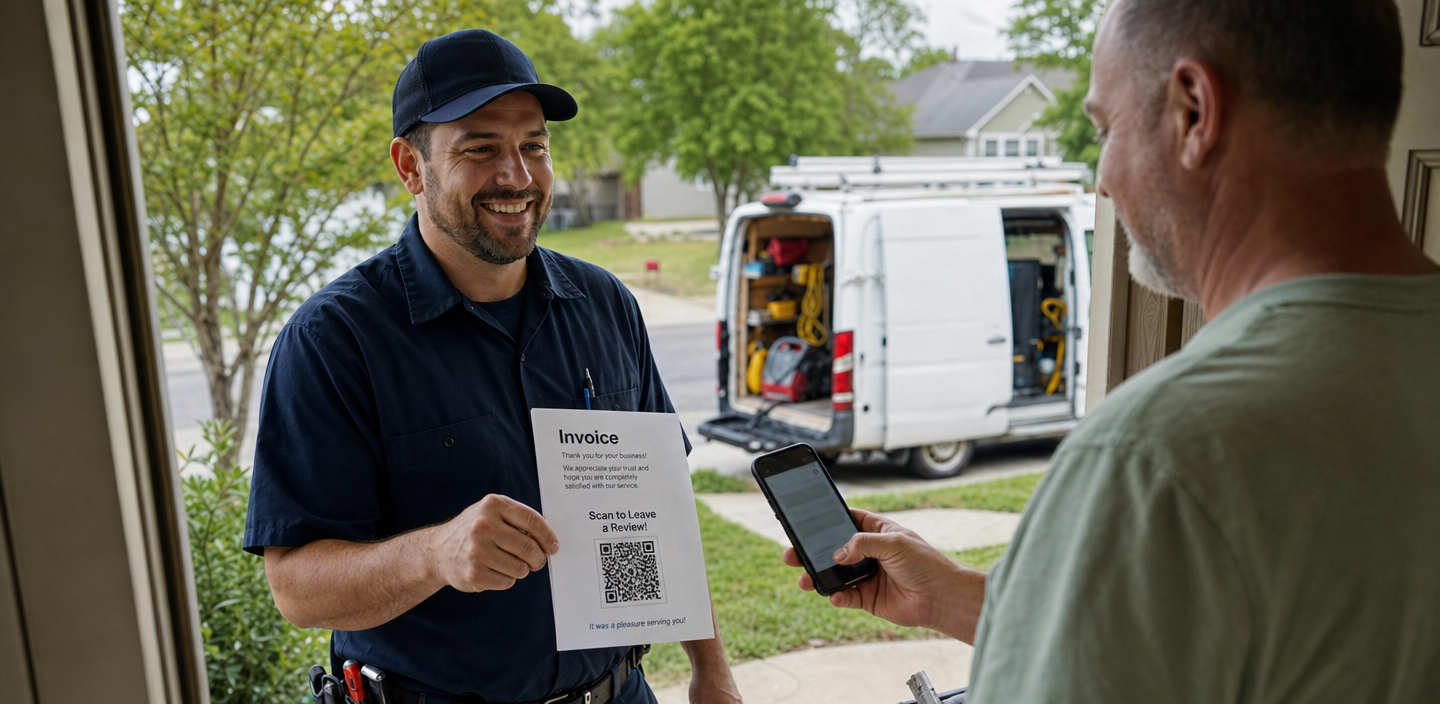
Second, provide a direct review link or QR code so that leaving feedback takes 10 seconds instead of 2 minutes of hunting. Your Google Business Profile generates both for free. A plumber who prints that QR code on the bottom of every invoice removes the friction that kills most requests.
Third, make the ask routine. Ask every genuine customer rather than trying to guess who will leave five stars. Once reviews start coming in, respond to them – that’s the next part of the system.
What you can’t do? Don’t offer discounts or freebies in exchange for reviews, ask only the customers you expect to leave five stars, or give technicians a quota of reviews they have to generate. Google classifies those practices under fake engagement and rating manipulation.
That’s the quick version – here’s exactly how to build these habits into your day-to-day operations.
Proven Ways to Ask for More Google Reviews
You probably already have happy customers. The problem is that happy customers are usually quieter than unhappy ones. If you want more Google reviews, you need to make asking part of the job – not something you remember to do two weeks later.
Ask Right After the Job Is Done
Timing beats everything else. Send the ask right after the job is done – same-day text or email, ideally within a couple of hours of the crew packing up. One request, one reminder. That’s the whole cadence. The goal is to catch satisfied customers at the moment when they’re most likely to remember the details of the service and take a minute to share their experience.
Simple Text & Email Request Scripts
The review request doesn’t need to sound like a marketing campaign. In fact, shorter and more personal is usually better. Keep the script short and open-ended. For example:
“Hi Dana, thanks for choosing us for your water heater replacement. Would you mind sharing your experience on Google? Here’s the link.”
The email version is the same, one line longer. Thank the customer, mention the service you completed, and give them a direct link to leave a review. Don’t script the wording for them and don’t tell customers what to write or ask them to mention a technician by name.
Make Reviewing Easy With QR Codes & Short Review Links
Even a happy customer may skip leaving a review if the process takes too many steps. Remove as much friction as possible by giving them a direct review link or a QR code they can scan with their phone.
You can place the QR code on printed invoices, business cards, leave-behind materials, service folders, or other materials customers receive at the end of a job. If you want a more branded design, tools such as Uniqode or QR Code Chimp can help you create customized QR codes.
For companies handling a larger number of jobs each week, messaging platforms such as Textedly or Apptoto can also help automate review requests. Automation isn’t necessary for every contractor, but it can make the process much easier to manage as your business grows.
Add Your Google Review Link Throughout the Customer Journey
Don’t rely on a single text message to generate reviews. Make your review link easy to find anywhere an existing customer might interact with your business.
Add it to your email signature, invoices, post-job follow-up emails, customer thank-you pages, printed materials, and website. You can also add a review button or widget to your site so satisfied customers always have a clear next step.
This works especially well when review generation is part of a broader local marketing system. Combined with strong SEO, useful website content, and other content marketing strategies for local businesses, a steady stream of genuine customer reviews can help strengthen your online presence and give prospective customers more confidence in your business.
Want help building a system that turns completed projects into reviews, visibility, and new leads? Get a free estimate and see how Loona can help grow your construction business.
And remember: getting reviews is only half the job. How you respond to and manage those reviews matters, too.
Managing And Responding to Google Reviews
A review doesn’t stop working once it’s published. Your response sits right underneath it, giving future customers another clue about what it’s like to hire you.
And while responding to a five-star review is easy, the real test is what you do when someone is frustrated, unreasonable, or tells a version of the story you don’t agree with. The goal isn’t to win an argument in public. It’s to show the next person reading that your business is responsive, professional, and paying attention.
Replying to Positive Reviews
Positive reviews don’t need paragraphs. A quick, personal response is enough. Thank the customer by name and mention the job: “Thanks, Marcus. Glad we could get the AC back on before the weekend.” That takes fifteen seconds and sounds much better than a canned “Thank you for your five-star review!”
Skip the keyword stuffing, sales pitch, and copy-pasted replies. If every response says, “Thank you for choosing the best HVAC contractor in Dallas,” customers can tell exactly what you’re doing. Treat it like a real conversation: say thanks, make it personal, and move on.
Handling Negative Reviews the Right Way
Negative reviews are where many business owners get stuck. The instinct is either to ignore them or immediately explain why the customer is wrong. Neither looks particularly good to the people watching from the sidelines.
Respond promptly (ideally within 24 to 48 hours), keep it calm and brief. Acknowledge the customer’s frustration, address what you can reasonably address, and invite them to continue the conversation by phone or email if the situation requires more detail. Short beats defensive. Everyone shopping your Google Business Profile is reading how you handle the one-star more closely than the fifty five-stars.
Something as simple as this often works: “Hi James, we’re sorry the experience didn’t meet expectations. We’d like to understand what happened and see what we can do to make it right. Please give our office a call at [number].”
You don’t need to admit to something that didn’t happen, and you definitely don’t need to litigate the entire job in a Google reply. Remember who the response is really for: not just the person who left the review, but every potential customer who reads it later.
What If the Review Is Unfair?
Some reviews will feel exaggerated. Others may come from people you don’t recognize at all. You can’t simply remove a review because you disagree with it, but reviews that violate Google’s policies can be reported for evaluation. For everything else, resist the temptation to start a public fight.
Respond professionally, state the facts briefly if necessary, and take the rest of the conversation offline. Also avoid offering discounts, refunds, or other incentives specifically in exchange for changing or removing a review. That can create a much bigger problem than the original complaint.
Make Review Management a Routine
You don’t need to watch your Google Business Profile every hour. You need a routine. Pick two days a week – Monday and Thursday, for example – to check new reviews and respond to anything waiting. Then look at your overall review volume, rating, and Google Business Profile visibility each month to see whether things are moving in the right direction.
That keeps review management from becoming one of those tasks you only remember when a bad review appears. Learning how to get Google reviews is only half the work. The other half is showing customers (past and future) that you’re actually listening.
In practice, the strongest review system is usually much simpler than owners expect. Here’s what that workflow looks like for a home service team.
A Review Workflow for Home Service Teams
For roofing, HVAC, plumbing, and other home service businesses, that often means a short text after the appointment plus a QR code on the invoice or leave-behind. The companies that make both part of the normal workflow tend to build reviews steadily. The ones that ask only when someone remembers – or when a customer seems especially happy – usually don’t.
The bigger problem is rarely the tactic. It’s getting the whole team to follow it consistently. A three-truck HVAC company, for example, can keep the process almost entirely in-office. The technician finishes the job, checks a box on the work order, and the customer automatically gets the review request later that day. No one has to manually remember to send a link.
But you need to set the expectation before the technician leaves. A simple “You’ll get a quick text from us later today if you’d like to share your experience” makes the message feel expected rather than random when it arrives a few hours later.
Does the review request have to come directly from the person who did the work? No. But that quick handoff between the technician and the automated follow-up can make the whole process feel much more personal.
And the benefit isn’t just a bigger review count. Over time, a steady flow of recent reviews also gives prospective customers more proof that the business is active, trusted, and consistently serving people in the area.
FAQ
01 How to generate Google reviews for free?
Ask customers directly right after a job is completed – a same-day text or email costs you nothing. Share your Google Business Profile's short review link or a QR code you generate yourself. Never pay for reviews or offer incentives; that violates Google's policies and risks removal.
02 How to get 1000 reviews on Google?
Build a consistent ask into every completed job, across your whole crew. Add QR codes to invoices, trucks, and email signatures so responding takes seconds. High counts come from sustained volume over years – treat it as a habit, not a one-time push.
03 How much does it cost to get Google reviews?
Asking your customers directly is free. Optional QR code generators or review-request software may run a small monthly fee if you're sending dozens of requests a week. Paying for the reviews themselves violates Google's policy and should never be part of your budget.
04 How do I view Google reviews?
Search your business name on Google or Maps, then open the reviews tab on your Business Profile. To see and reply to everything in one place, log into Google Business Profile Manager.
05 How do I create a QR code for Google reviews?
On a desktop browser, open your Business Profile, select “Read reviews,” then “Get more reviews.” Google lets you copy the direct review link or download a QR code from there. Then add that code to invoices, service vehicles, and your email signature.
Love what you’re reading? Sign up for our newsletter to get our newest articles, helpful tips, and fresh marketing updates delivered right to you. No spam, just the good stuff.