



To check how your website appears in Google, open Google Search Console and go to Performance → Search results. Enable Average position, choose a date range, and filter by the page, query, country, and device you want to investigate. The result is an average across recorded impressions, not a fixed live ranking or an exact page number. A manual search can show one example of the results, but location and other search conditions still matter.
Knowing where you rank tells you how well your SEO is working and which pages to improve next. Let’s start with the fastest method.
How to check your position in Google (step by step)
The quickest free way is Google Search Console:
- Open Google Search Console and select your property.
- Go to Performance > Search results.
- Tick the Average position box at the top of the report.
- Open the Queries tab to see the average position for each keyword, or the Pages tab to see positions per URL.
- Set a date range and compare two periods to see how your positions change over time.
Prefer a manual check? Open an incognito window, search your target keyword, and count where your page appears. Incognito mode keeps personalization and location from skewing the result.
Why knowing your Google position matters
Your position is the starting point for every SEO decision. Once you know where you stand, you can act on it instead of guessing. Here’s what your ranking tells you to do next.

Refine keyword optimization
Sitting on page two or three? That’s a signal to revisit your keyword strategy. Confirm your target keywords match search intent and optimize your title tags, headers, meta descriptions, and copy around them.
Improve content quality
A lower rank often means your content isn’t comprehensive enough. Audit the page to make sure it fully answers the query, and add images, video, or infographics to keep readers engaged — a signal Google rewards.
Strengthen your backlink profile
If rankings lag despite solid content, you may need more authority. Prioritize quality backlinks from credible sites in your niche to build trust and lift your position.
Improve user experience
Make the page fast, readable on mobile, and easy to navigate. Check Core Web Vitals alongside the usefulness of the content. Engagement metrics can help you identify usability problems, but they do not by themselves explain why a page ranks where it does.
Apply local SEO
If you’re losing local searches, refine your local SEO: keep your Google Business Profile accurate, fix your NAP details, and earn positive local reviews.
Watch your competitors
Track the sites that outrank you. Comparing their content, keywords, and backlinks regularly reveals new angles for your own strategy.
Test new approaches
Rankings move, so treat your current position as a baseline. Experiment with content formats, titles, and internal linking, then measure what moves you up.
4 ways to check your rank in Google
There are several ways to monitor your Google rankings, from a quick manual search to dedicated tracking software. Here are the four that matter, and when to use each.
1. Manual search (incognito mode)
The simplest way to check your ranking is a manual search in an incognito or private window. Incognito mode starts a separate browsing session and does not automatically sign you into your Google account. It does not hide your location or make results identical for every searcher. Use a manual search as a spot check, and record the country, device, date, and query when comparing results.
The trade-off: manual searches are slow if you track many keywords, and they give you no historical data — so you can’t see trends over time.
2. Google Search Console
Search Console is the best free way to see real positions for your own site. It reports keyword rankings, impressions, clicks, and average position straight from Google’s data.
The most useful part is the query report: you can see exactly which searches bring traffic, how often your pages appear (impressions), and how many clicks each query earns. The average position metric shows where you typically rank for a term, so you can watch movement over time and adjust. Search Console also surfaces your click-through rate (CTR) — the share of searchers who click after seeing you.
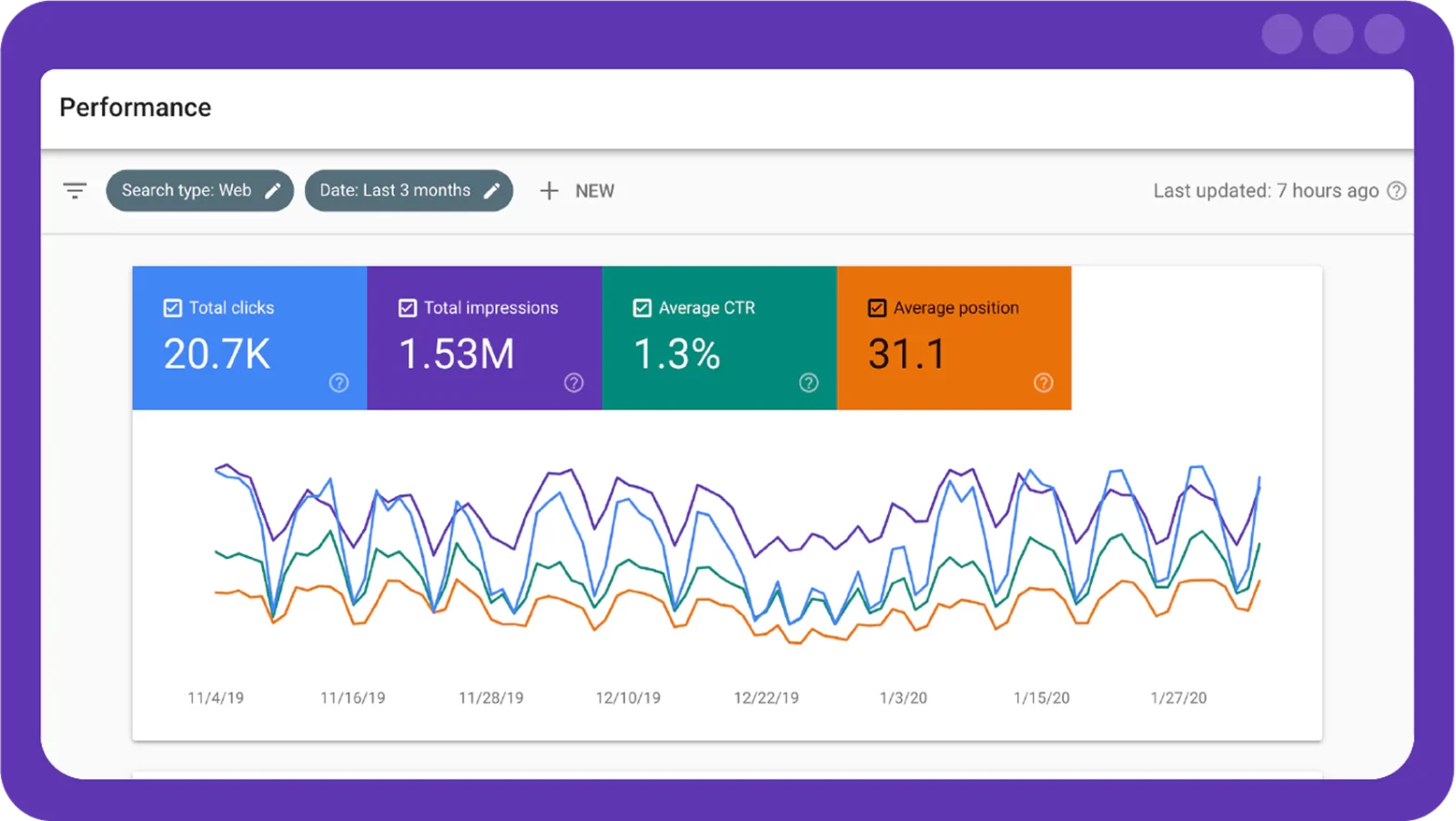
For a deeper comparison of what each Google tool measures, see our guide on Google Search Console vs Google Analytics.
3. Dedicated rank trackers (Ahrefs, SEMrush, Moz)
When you need to track many keywords, watch competitors, and keep historical data, a dedicated rank-tracking tool is worth it.
- SEMrush offers strong keyword tracking and competitive analysis, plus site audits, backlink checks, and actionable recommendations.
- Ahrefs pairs its Rank Tracker with deep backlink and keyword data, so you can follow rankings over time and spot opportunities competitors are winning. Ahrefs Webmaster Tools includes a free tier for your own verified site.
- Moz provides keyword rank tracking, site analysis, and Link Explorer for backlink research, with competitor comparison built in.
4. Compare the methods at a glance
| Method | Cost | Best for | Historical data | Local/geo |
| Manual incognito search | Free | A quick one-off check | No | Manual only |
| Google Search Console | Free | Real positions for your own site | Yes (16 months) | Limited |
| Ahrefs Rank Tracker | Paid (free WMT tier) | Many keywords + competitors | Yes | Yes |
| SEMrush Position Tracking | Paid | Daily tracking + alerts | Yes | Yes |
| Moz Rank Tracker | Paid | Simple weekly tracking | Yes | Yes |
What page of Google am I on?
Search Console does not tell you an exact results-page number. Average position combines many impressions, and different result formats can occupy positions differently. An average position of 14 does not mean your page always appears as the fourth result on page two. Compare the same query, URL, country, and device over time, or use a rank tracker configured for a specific location and device when you need a repeatable snapshot.
How to check your whole website’s position
The methods above check a single page for a single keyword. To see how your entire website is positioned across all its keywords, use Search Console’s Pages tab: open Performance → Search results → Pages to see the average position of every URL, then switch to the Queries tab to see every term the site ranks for. This gives you a site-wide view of where you stand, which pages are strongest, and which are stuck on page two or beyond and need work.
For keyword-level tracking across the whole site over time, a rank tracker like Ahrefs or SEMrush stores historical positions for every keyword you add, so you can watch site-wide movement instead of checking pages one by one.
Tips for more accurate ranking checks
To keep your checks accurate and consistent, follow these habits.
Use incognito or private browsing
Run every check in an incognito window so search history, location, and past behavior don’t tailor the results. You’ll see a more realistic ranking.
Check from multiple locations
Rankings vary by geography. For a fuller picture, check from several locations or use a tool that supports global rank tracking.
Track rankings on a schedule
Rankings shift constantly, so check the same keywords on a regular cadence. Consistent checks reveal patterns and show the impact of your changes.
Track mobile and desktop separately
Google ranks mobile and desktop results differently, so monitor both. Mobile in particular keeps growing in importance for SEO.
Stick to legitimate tools
Use credible tools like Search Console, Ahrefs, or SEMrush. They return more stable, accurate data than repeated manual checks.
Focus on the right keywords
Prioritize keywords tied to your market and business goals, and include long-tail terms — they’re less competitive and often a clearer measure of real performance.
Understanding ranking fluctuations
Rankings move all the time, and knowing why helps you respond calmly instead of overreacting.
Algorithm updates
Google updates its algorithms regularly, and these updates can shift rankings based on your content quality, links, and overall SEO health. Staying aware of updates helps you interpret sudden changes.
Competitor activity
Competitors constantly update their sites and SEO. When their rankings move, yours can too — so keep an eye on what they’re publishing and earning links for.
Seasonal trends
Some keywords swing with the season, an event, or a holiday. We saw this with AVVA Experience, an events firm: by aligning their content with event-based search terms, we boosted their visibility right when demand peaked, putting them in front of clients at the key moments.
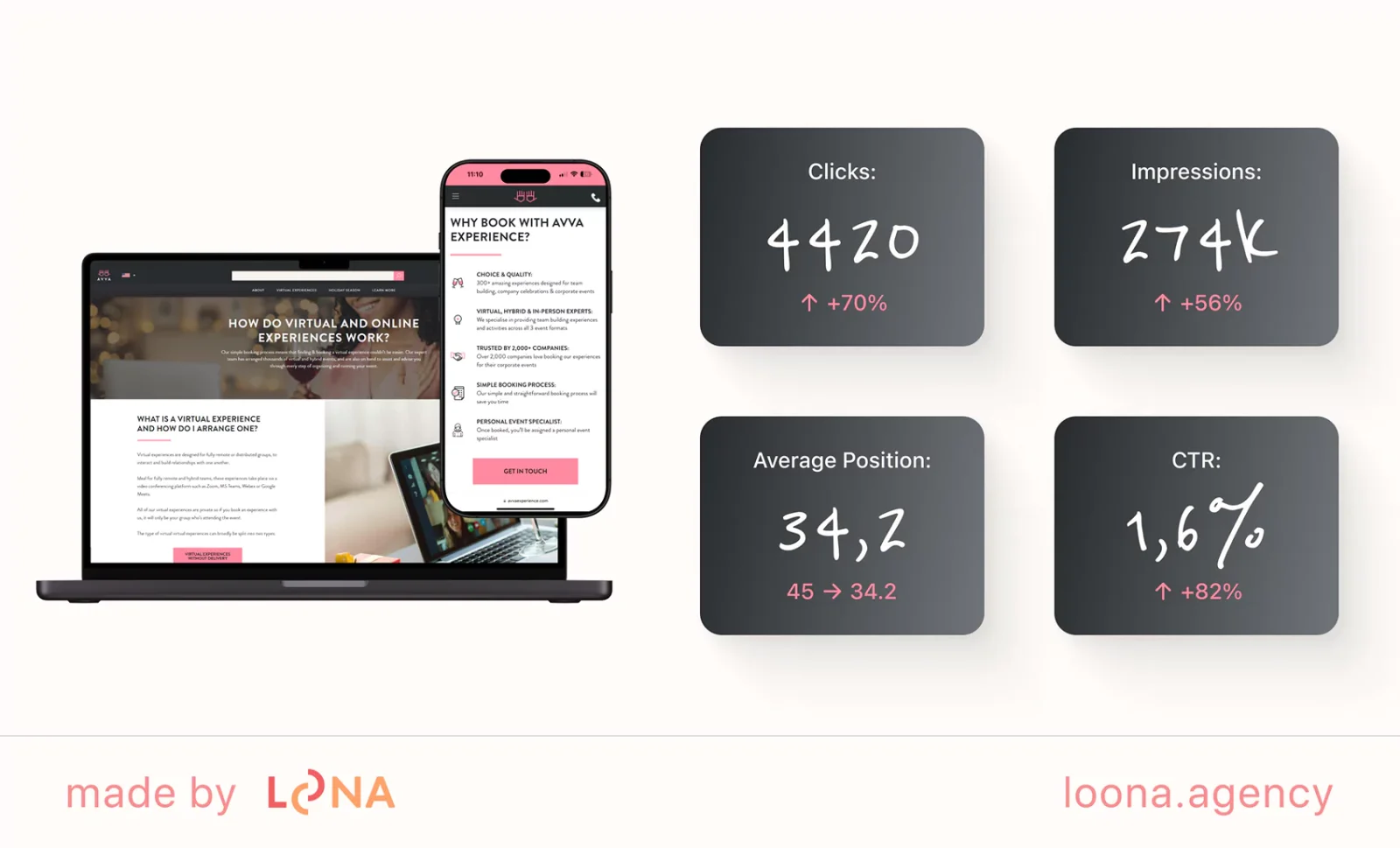
This speaks to how leveraging seasonal trends and optimizing for event-related keywords can truly make a huge impact on your site’s search performance and relevance.
Search intent and user behavior
Google continually refines how it reads intent. When the way people interact with results changes — different click patterns or engagement — rankings can adjust to match.
Content updates
Refreshing or expanding your content can move rankings. Google favors fresh, helpful content, so keeping pages current helps you hold or improve your spot.
Backlink changes
The number and quality of your backlinks strongly influence rankings. Gaining or losing links — or competitors changing theirs — causes movement. With Plum ProExteriors, a home-improvement firm, we focused on earning links from high-authority sites in their niche, which lifted their credibility and kept their rankings competitive over time.
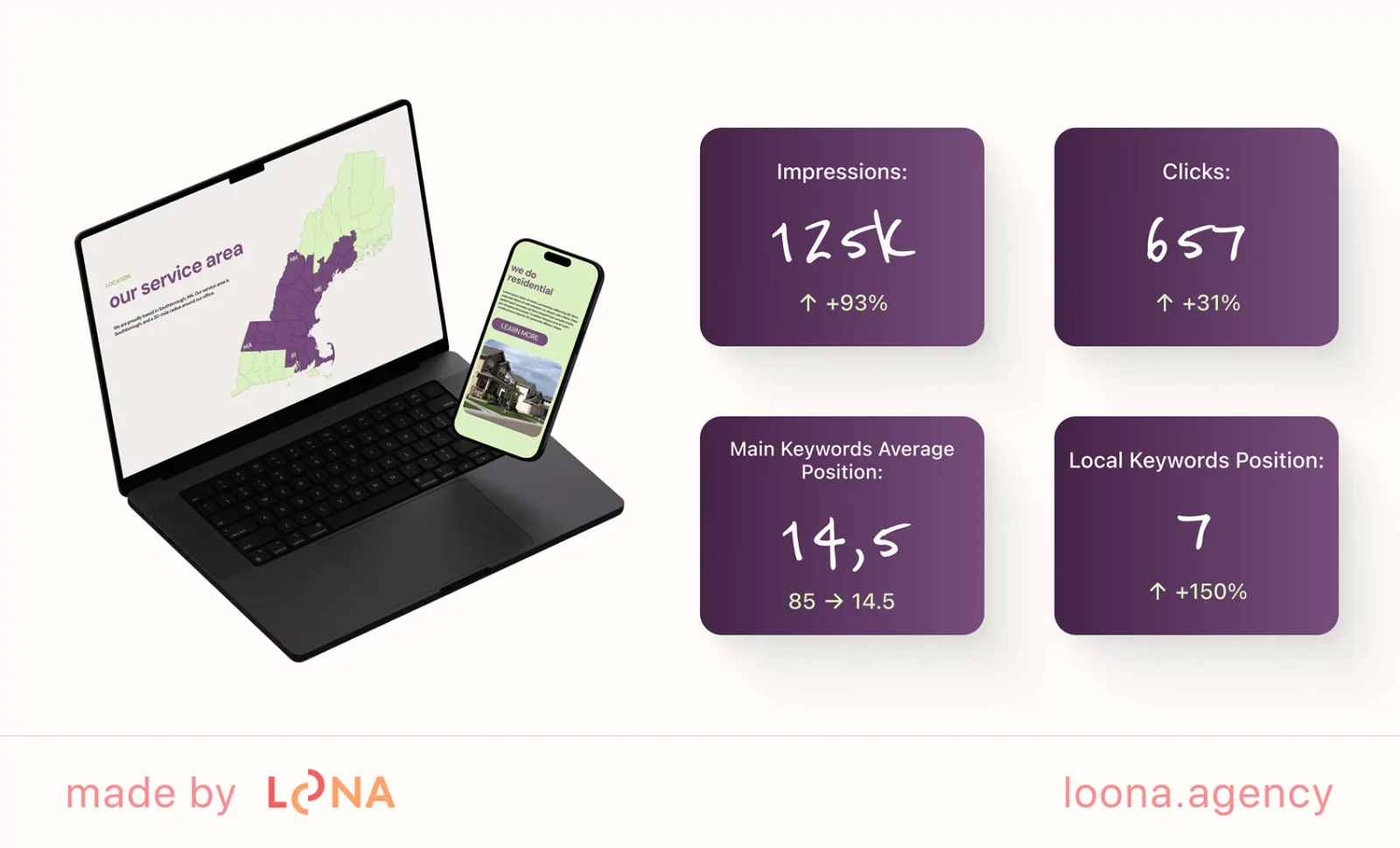
Fluctuations are normal. Understanding the cause lets you plan strategically and keep your visibility steady.
Conclusion
Tracking your Google position is essential if you want your SEO to pay off. Free tools like Search Console — or a paid tracker like Ahrefs or SEMrush — show exactly how your site performs in search.
Check your position regularly to spot trends, fix weak pages, and adjust your strategy. Whether the fix is better content, stronger backlinks, or a faster site, knowing where you rank is the first step to growing organic traffic.
For contractors deciding which pages to improve next, our guide to construction SEO opportunities connects keyword research with services and markets.
Need expert help tracking and improving your rankings? Our team builds custom SEO plans that grow your visibility and your business. Contact us to get started. (New to this? Our DIY SEO guide is a good next read.)
FAQ
01 How can I track Google ranking?
Use tools like Google Search Console, SEMrush, or Ahrefs to track your Google ranking. Manual incognito searches work too, but they don't give you historical data or accurate averages.
02 How do I monitor search engine positions for free?
Google Search Console shows your average position for every query at no cost. Ahrefs Webmaster Tools offers a free tier for tracking specific keywords, while SEMrush and Ahrefs paid plans add competitor and location tracking.
03 What page of Google am I on?
Each Google results page shows about 10 organic results, so positions 1-10 are page 1, 11-20 are page 2, and so on. Check your exact position in Search Console under Performance > Queries with Average position enabled.
04 Why should I check my Google website position?
Checking your position shows how effective your SEO is and reveals which pages and keywords to improve, so you can prioritize the changes that lift visibility and traffic.
05 How often should I check my Google search rankings?
Weekly or every other week is enough for most sites. Competitive niches may need daily tracking; low-competition niches can be checked monthly.
06 How do I check my website’s position on Google?
You cannot convert Search Console’s average position into an exact Google results-page number. Filter the report by query, URL, country, and device to understand your average visibility. For a specific search snapshot, check the results under defined conditions.
Love what you’re reading? Sign up for our newsletter to get our newest articles, helpful tips, and fresh marketing updates delivered right to you. No spam, just the good stuff.