




A website can look modern and still fail to generate traffic or leads. If pages load slowly, navigation is confusing, mobile elements are hard to use, or important content is hidden, users leave faster and search engines may struggle to understand the page. This is why web design and SEO should be planned together from the beginning.
In this guide, we’ll explain how SEO website design works, which design elements affect organic performance, how mobile-first indexing changes the way websites should be built, and what business owners should check before redesigning a site. The goal is not just a better-looking website — it is a website that users can navigate, Google can understand, and your business can convert into leads.
The “why”: the interconnection
Low organic performance is not always caused by weak content or poor backlinks. Sometimes the problem starts with design decisions that make the website harder to crawl, slower to load, more difficult to use on mobile, or less clear for visitors.
Design shapes how users move through the website, while SEO helps search engines understand the content, structure, and purpose of each page. Google describes SEO as a way to help search engines understand your content and help users decide whether to visit your site. That means design and SEO are not separate layers — they influence the same user journey.
UX/UI design, technical SEO, content structure, and conversion strategy should work as one system. A visually attractive website can still underperform if the headings are unclear, internal links are weak, images are too heavy, mobile layouts hide important content, or calls to action do not match user intent. The best website design for SEO balances visual clarity, crawlability, usability, and lead generation.
How SEO website design provokes the bounce rate
Think about your own behavior in search results. If a page loads slowly, shows intrusive pop-ups, hides the main answer, or looks unreliable on mobile, you are likely to return to Google and choose another result. That user reaction does not mean bounce rate is a simple ranking factor, but it does show a real business problem: the page failed to satisfy the visitor.
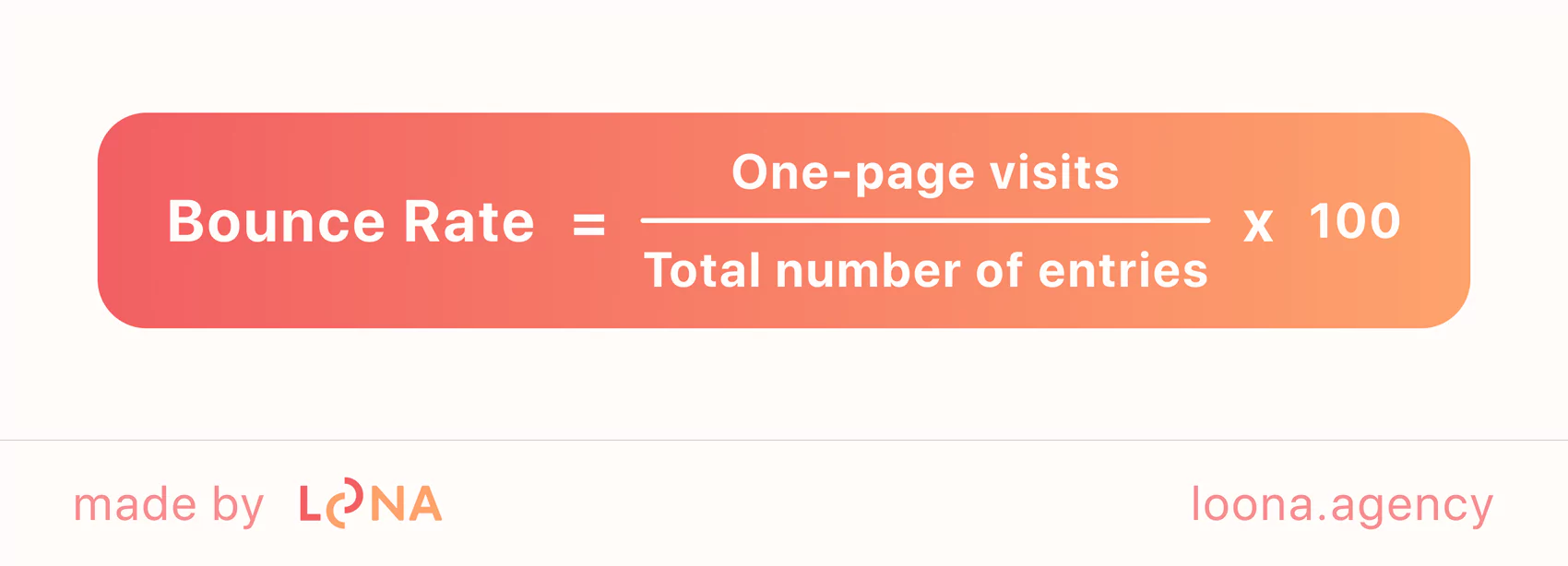
Bounce rate shows how many visitors leave after viewing only one page. It can be useful for diagnosing UX or content problems, but it should not be treated as a direct ranking formula. A high bounce rate may be normal for some pages, such as quick-answer articles, but it becomes a warning sign when users leave because the page is slow, confusing, incomplete, or difficult to use.
This is how the search network determines whether a resource is interesting or useful to people and whether it needs to be promoted higher. Factors that increase the bounce rate and make an awful SEO website design:
- Confusing site structure that makes it hard to understand where the user is and what to do next.
- Outdated visual design that makes the brand look less credible than competitors.
- Intrusive pop-ups or ads that block the main content, especially on mobile devices.
- Slow loading caused by heavy images, large scripts, animations, or unoptimized fonts.
- Weak content structure that makes the page hard to scan.
- Misleading or aggressive calls to action that reduce trust instead of encouraging action.
All of these issues affect SEO-friendly web design because they influence whether users can quickly understand, trust, and use the page. When design supports clear navigation, fast loading, readable content, and strong calls to action, the website has a better chance to keep visitors engaged and convert organic traffic into leads.
Average time on page
Time on page can help you understand whether visitors find the content useful, but it should be interpreted in context. A short session can mean the user found an answer quickly, while a long session can mean either high engagement or confusion. For SEO web design, the goal is to make the page easy to scan, read, and act on.
- small or low-contrast text;
- distracting colors or visual noise;
- vague headings that do not match search intent;
- slow-loading images, scripts, or animations;
- poor spacing between sections;
- calls to action that appear before trust is built.
The biggest problem appears when the user realizes the page does not answer the question that brought them there. Strong design cannot compensate for missing information. SEO, UX, and content need to work together so the page delivers the right answer in the right format.
Content structure and scrolling
Users do scroll, but the top part of the page still carries the most responsibility. Nielsen Norman Group’s eye-tracking research found that people scroll more than before, yet they still spend more attention near the top of the page. For SEO website design, this means the first screen should clearly explain what the page is about, who it is for, and what value the user will get by continuing.

A good page structure gives users a reason to keep moving. Clear headings, short paragraphs, useful visuals, comparison blocks, FAQs, proof points, and relevant internal links help users understand the page faster. The goal is not to force scrolling, but to create a logical path from search intent to trust and conversion.
Interactive elements and the user’s attention
Interactive elements can improve engagement when they solve a real user problem. Calculators, quizzes, filters, comparison tools, surveys, accordions, and interactive visuals can make a page more useful, especially when users need help choosing a service, estimating a cost, or comparing options.
However, interactive design should not be added only to increase time on page. Heavy animations, unnecessary sliders, and complex widgets can slow the website down and hurt the user experience. The best interactive elements are lightweight, accessible, mobile-friendly, and directly connected to the page’s purpose.
For example, a service business can use a quote estimator, a SaaS company can use a feature comparison tool, and an ecommerce site can use guided filters. In each case, the design supports SEO because it improves usefulness, not because it artificially keeps users on the page.
Visual engagement factors
Visual design affects SEO indirectly by shaping readability, accessibility, and user trust. Text should be easy to read on desktop and mobile, with enough contrast, comfortable line spacing, clear section breaks, and font sizes that do not require zooming. Design choices should guide attention toward the main content and calls to action instead of distracting from them.
When content is visually clear, users can scan the page faster, understand the message more easily, and move toward the next step with less friction.
Design elements that affect SEO
The best time to think about SEO is before the website is designed or redesigned. Page templates, navigation, content blocks, mobile layouts, image handling, and heading structure all affect how well the website performs after launch. If SEO is added only after design approval, many important decisions may already be expensive to fix.
For organic growth, web design and SEO should work together across four areas: structure, speed, mobile usability, and content clarity. These elements influence how search engines access the site and how users decide whether to stay, trust the brand, and convert.
Heading hierarchy and page structure
Heading hierarchy creates the page’s logical structure. It helps users scan the content and helps search engines understand the relationship between sections. This matters not only for blog posts, but also for service pages, landing pages, product pages, and about pages.
Correct H1-H6 layout and how the crawler reads it
Search engines use page titles, meta descriptions, headings, internal links, and visible content to understand what a page is about. The H1 should describe the main topic, while H2 and H3 headings should break the content into logical sections. Headings should not be used only for decoration — they should help both users and crawlers understand the page.
If headings do not match the user’s intent, visitors may assume the page is irrelevant and leave. Clear headings improve scanning, support accessibility, and make the page easier to evaluate.
Design as a way to emphasize the logic of content
Large, unbroken blocks of text are one of the most common mistakes in SEO website design.
Strong design needs strong content. If the page structure is clear but the copy is vague, users still may not convert. This is why SEO-focused design should work together with SEO content that answers user questions, supports trust, and guides visitors toward action.
Content should be broken into sections that help users compare, scan, and decide. In addition to H2 and H3 headings, a strong SEO-friendly page can include:
- short paragraphs;
- bullet lists;
- comparison tables;
- screenshots or product visuals;
- relevant illustrations;
- case study blocks;
- FAQs;
- testimonials;
- clear calls to action.
Each design element should support the user’s decision-making process. Images, tables, icons, and animations should clarify the content, not fill space. If a visual does not help the user understand the offer, process, benefit, or proof, it may distract from the page’s goal.
Impact on behavioral metrics through color scheme, fonts, readability
Fonts, colors, and spacing influence how users perceive the brand and how easily they can read the page. From an SEO perspective, the priority is not having the most unique design. The priority is making content readable, accessible, fast, and consistent across devices.
A strong visual identity can improve brand recognition, but it should not harm usability. Custom fonts should load quickly, remain readable on small screens, and include fallback options. Colors should create enough contrast, and layouts should make the main content easy to follow.

For SEO website design, brand consistency matters because it helps users recognize and trust the company. However, design decisions should always be balanced with performance. Heavy font files, oversized visuals, and unnecessary animations can reduce speed and make the page harder to use.
The strongest design systems are consistent, lightweight, accessible, and conversion-focused. They make the brand memorable without making the website slower or harder to navigate.
Mobile adaptation
Mobile design is one of the most important parts of SEO website design. Many users discover, compare, and contact businesses from smartphones, so every important page must be readable, fast, and fully functional on mobile. This includes text size, button spacing, navigation, forms, images, menus, and interactive elements.
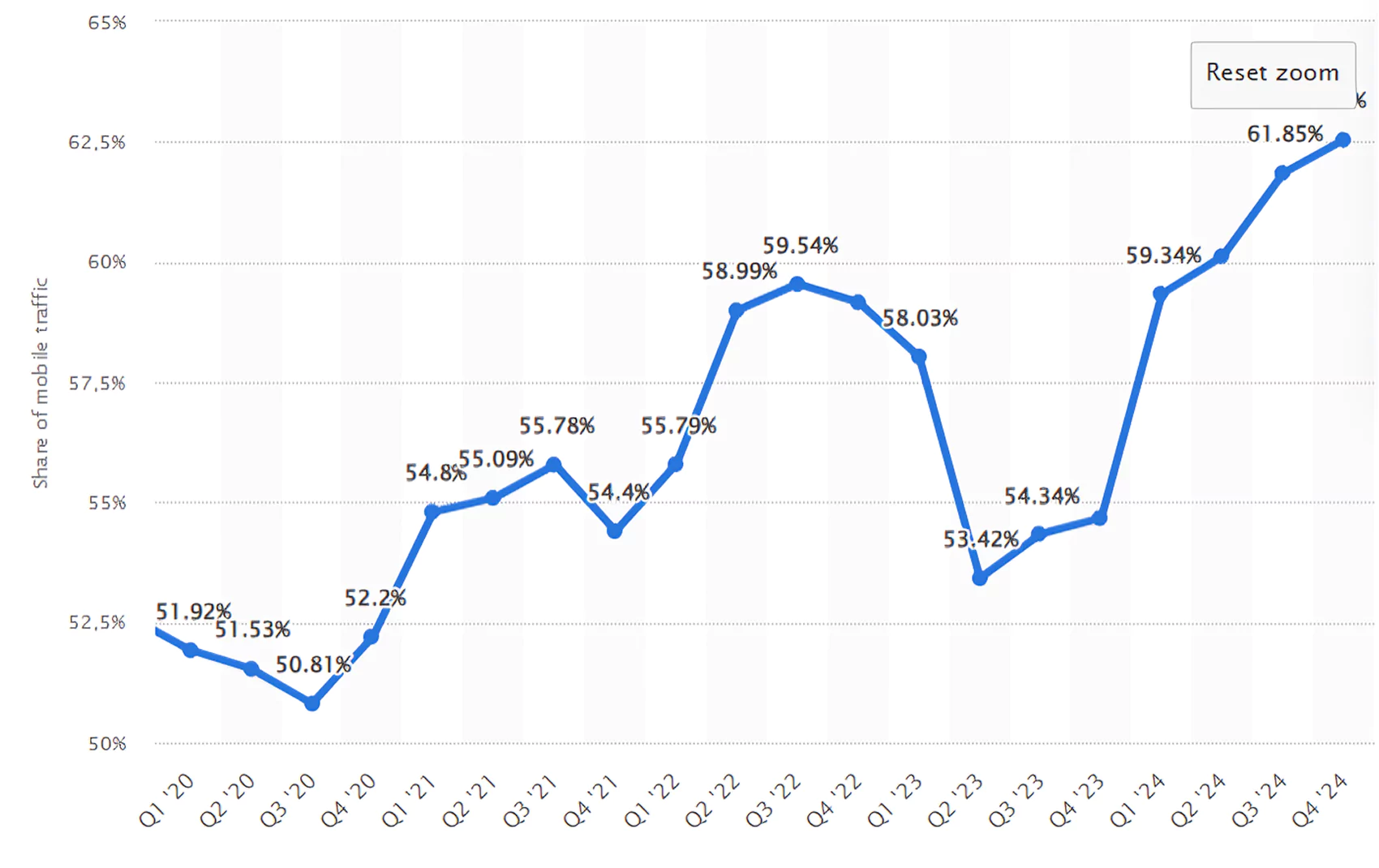
Google uses mobile-first indexing, which means it primarily uses the mobile version of a site’s content for indexing and ranking. If the mobile version has less content, missing structured data, blocked resources, poor navigation, or slower performance, Google may understand the page differently from the desktop version.
When a site is not responsive, users encounter inconveniences: small buttons, slow loading, annoying pop-ups — this makes them leave immediately. Search engines quickly scan for such “red flags”:
- important content missing on mobile;
- buttons that are too small or too close together;
- menus that are difficult to open;
- oversized images;
- intrusive interstitials;
- slow loading;
- forms that are hard to complete;
- desktop and mobile pages showing different metadata or structured data.
Mobile-first indexing does not mean desktop design no longer matters. It means the mobile version must contain the same primary content, metadata, images, videos, and structured data as the desktop version. Google also advises making sure it can access and render mobile content and resources.
For example, if a service page has detailed content on desktop but hides pricing factors, FAQs, reviews, or service details on mobile, users and Google may receive a weaker version of the page. The design can still look clean, but the page may fail because it removes the information needed to rank and convert.
This can reduce engagement, lower conversion rates, and make the page less competitive against mobile-first competitors.
A beautiful design cannot compensate for poor usability. If users cannot read the text, tap the CTA, open the menu, submit a form, or understand the offer within a few seconds, the design is not supporting SEO or business growth.
This is why redesign projects should include SEO from the planning stage. When Loona worked with Plum ProExteriors, the goal was not only to improve the look of the website. The project also focused on local visibility, clearer structure, better content, stronger mobile usability, and a conversion path that helped turn visitors into leads.
When a mobile page loads quickly, shows the same important content as desktop, and gives users a simple path to act, it becomes easier for both people and search engines to evaluate. A responsive design should preserve content value while improving the mobile experience.
The goal is not to copy the desktop layout exactly. The goal is content parity: the mobile page can look different, but it should provide the same essential information, metadata, structured data, internal links, and conversion options.
The synergy in action: examples and benefits of SEO web design
The relationship between web design and SEO becomes clearer when you look at real business cases. A redesign should not only improve visuals; it should remove barriers that prevent users from finding, trusting, and contacting the company.
Plum ProExteriors is a roofing and exterior services company that needed stronger local visibility and a website that could support lead generation. The challenge was not only rankings. The website also needed clearer structure, stronger service presentation, better mobile usability, and a more trustworthy user experience. Loona supported the project through:
- Local growth strategy. We analyzed the market, service areas, and search demand.
- Local SEO setup. We improved visibility for location-based searches and local service intent.
- Content creation. We developed service pages and blog content that answered relevant customer questions.
- Authority building. We worked on relevant links and trust signals to strengthen organic performance.
- Google Business Profile optimization. We improved the company’s local presence and customer interaction signals.
- Google Maps visibility. We supported better discoverability for mobile-first local searches.
- Website redesign. We improved structure, usability, service presentation, and conversion-focused design.
Our approach combined local SEO, content strategy, technical improvements, and conversion-focused web design. The website needed to be easier for users to understand and easier for search engines to crawl and evaluate. By aligning design with SEO goals, we helped the business create a stronger foundation for organic visibility and qualified local leads.
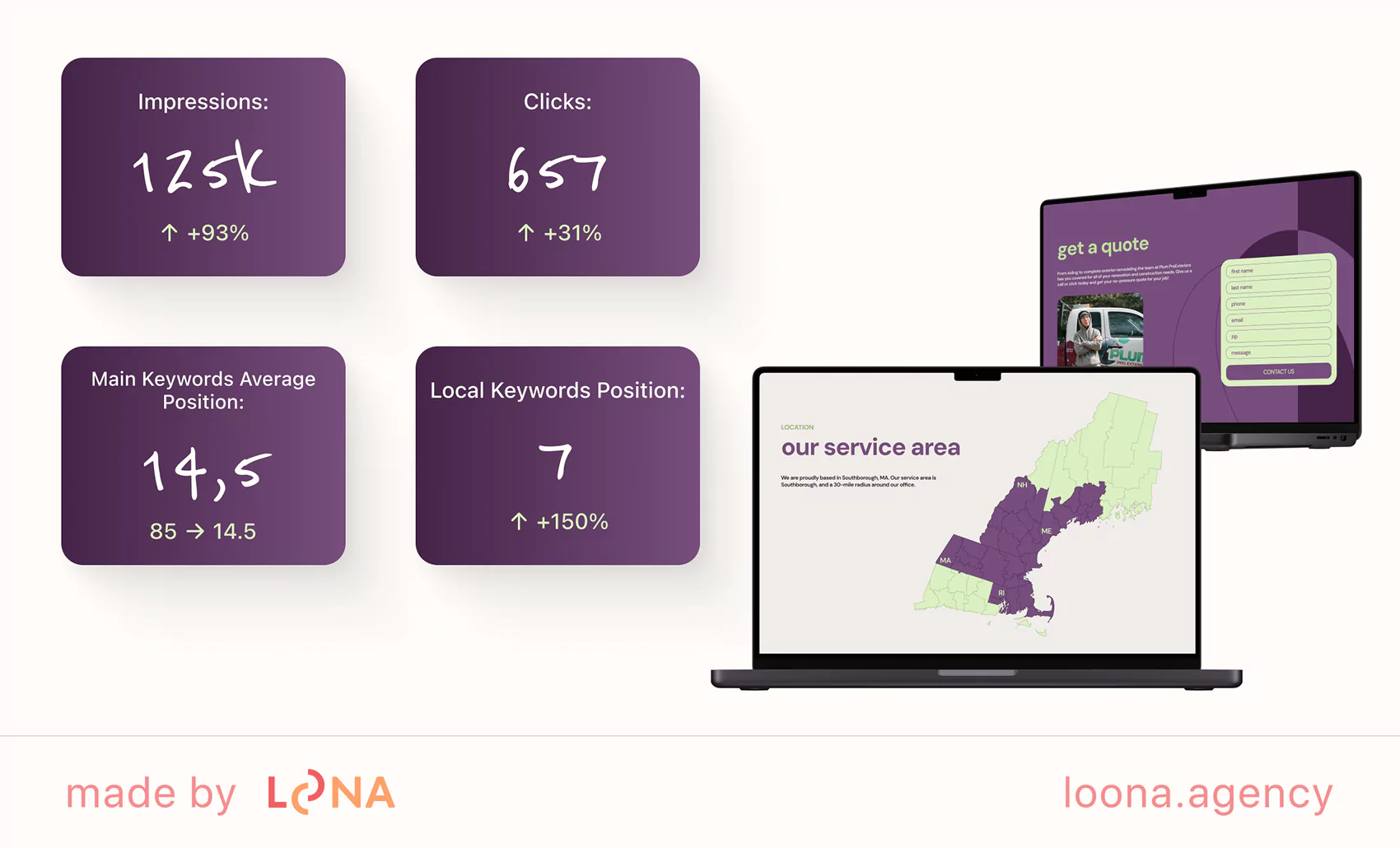
This case shows why web design and SEO should not be handled as separate projects. Content, technical SEO, mobile usability, local optimization, internal linking, and conversion design all support the same goal: helping the right users find the website, trust the company, and take action.
Actionable steps for your business
Before redesigning a website, audit the elements that affect both organic visibility and user experience. This helps your team avoid launching a beautiful website that loses rankings, hides important content, or fails to convert visitors.
Where to start and what to check first
Start with a combined UX and SEO audit. You do not need access to the full codebase to identify many common problems. Open the website as a real user, test it on mobile, and check whether the page makes the next step obvious.
- Mobile usability. Open the site on a phone. Is the text readable? Are buttons easy to tap? Is the menu simple to use?
- Navigation. Can users find services, pricing information, case studies, contact details, and the main CTA without confusion?
- Content visibility. Is the same important content available on mobile and desktop? Are FAQs, reviews, service details, and internal links visible?
- CTA clarity. Do buttons explain what happens next, such as “Get a quote,” “Book a consultation,” or “View case study”?
- Speed. Use PageSpeed Insights or Search Console to check loading performance and Core Web Vitals.
- Technical basics. Check titles, meta descriptions, headings, broken links, image alt text, canonicals, and sitemap status.
- Trust signals. Make sure reviews, case studies, contact details, author information, and company details are easy to find.
Use this checklist before approving a redesign. It will help designers, developers, and SEO specialists work from the same priorities instead of fixing problems after launch.
How to adapt your SEO web design for mobile-first indexing
Mobile-first indexing means your mobile version must be complete, accessible, and easy to use. A mobile redesign should not remove important content or hide key SEO elements. Use this checklist to keep the mobile version strong for both users and search engines.
| Point | Why It Matters | What to Do |
| Content Visibility | Google indexes mobile content. Hidden texts may be skipped. | The text must be visible. Avoid hiding content in expandable blocks. |
| Mobile Speed | Heavy elements can slow down page load times, increasing the bounce rate. | Use lightweight fonts, fewer animations, and responsive images. |
| Logical Structure | Search engines rely on proper heading hierarchy to understand content. | Use H1-H6 consistently. Don’t skip H1. Avoid random or decorative headings. |
| Interface | Users interact with thumbs, not cursors. Tiny buttons cause frustration. | Make buttons large enough to tap. Check the spacing between elements. |
| Simplification | Desktop-level design overloads mobile devices and users. | Remove unnecessary effects. Focus on clarity and core functions. |
If a mobile website loads slowly, hides content, or makes navigation difficult, it can weaken both search performance and conversions. Mobile-friendly design is not only a UX requirement — it is part of how modern websites are crawled, understood, and evaluated.
What no website can do without
Web design and SEO work best when they are planned as one system. A strong website should look credible, load quickly, work smoothly on mobile, communicate clearly, and help search engines understand every important page. Design should not only impress users visually — it should help them find information, trust the brand, and take action.
Templates and intuition are not enough for a website that needs to rank and convert. The best results come from a team that understands users, search engines, and business goals at the same time. Loona combines SEO strategy, UI/UX design, technical SEO, and content planning to build websites that are easier to find, easier to use, and easier to convert.
FAQ
01 How to improve SEO performance?
Start with a technical and UX audit. Check crawlability, indexability, page speed, Core Web Vitals, mobile usability, titles, meta descriptions, heading structure, internal links, content quality, and conversion paths. Then prioritize fixes that improve both search visibility and user experience.
02 How are web design and search engine optimization related?
Web design affects SEO through site structure, mobile usability, page speed, internal linking, content readability, accessibility, and conversion flow. A website can look good but still underperform if search engines cannot understand it or users cannot easily navigate it.
03 What are the most common design mistakes that harm SEO?
Common mistakes include unclear navigation, poor heading structure, hidden mobile content, slow loading, oversized images, intrusive pop-ups, low-contrast text, small buttons, weak internal linking, and CTAs that do not match user intent.
04 What is SEO website design?
SEO website design is the process of creating a website that works well for both users and search engines. It combines clear structure, mobile-friendly layouts, fast loading, readable content, accessible navigation, optimized headings, internal links, and conversion-focused UX.
Love what you’re reading? Sign up for our newsletter to get our newest articles, helpful tips, and fresh marketing updates delivered right to you. No spam, just the good stuff.